
Clear Photos1.0.1 - Google Play
You'll be able to see results in few seconds.
Publisher Description
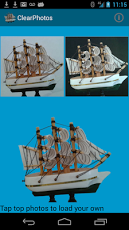
Create transparent background photos in seconds with ClearPhotos. If you have tried it before, you know how time-consuming it can be to make the background of your favorite photos transparent even with the most expensive software packages. Now you can make transparent background photos using our ClearPhotos app in a breeze, literally in seconds instead of minutes or hours. This app is designed for your Android phone/Tablet. You take the photos, and then use the app to make the background transparent, no matter how complex the photos are. For a tutorial, visit Youtube at: http://www.youtube.com/watch?v=ux3HgKhvXmI&feature=youtu.beIt's all automatic, and no painful tracing or manual editing involved. Our calibration algorithm has been used to generate transparent background photos for hundreds of images automatically in a single run – unbelievably fast!To avoid shadows, take the photos during day time. Bright daylight is best for making transparent background photos. If you look at the details in the example photo, you can see through the sail in this model ship because those tiny holes are also made transparent. How can this be done if you had to do it manually?Here are step by step instructions:Step 1: Setup the studio. The studio can be just as simple as your home, using the wall as background. You will need:a) Dark background: A piece of black cloth with a size large enough to cover the entire scene to be photographed. The best choice would be 100% cotton black cloth bought from a fabric store. Cotton cloth has the nice property of diffuse reflection, while polyesters and nylons may cause unwanted specular reflection. Hang the cloth on the wall with pushpins.b) White background: A white paper such as the printer paper will do. Make sure the size is large enough to cover the entire scene. White cotton cloth is even better. The white reference will be used later.c) The object to be photographed. This can be anything you want to photograph. Small or big, complex or simple. Or it can be a live person. As long as the size is smaller than the black and white background.d) An android phone or tablet fixed on a tripod with a holder. If you don’t have a tripod, you can attach the phone/table to a stable object (such as a bottle) using a rubber band. The camera needs to steadily point to the wall. Adjust the distance so that the dark and white backgrounds, and the object are within the field of view entirely.Step 2: Take the photos: take a photo of the object with the dark background first, then cover the dark background with the white background and take the second photo. This creates a pair of images to be used for processing. For best effects, take the photos during day time with plenty diffuse light. You could also use camera flash but it may cause shadows in the images.Step 3. When the pair of photos is taken, start the ClearPhotos software and load these two images. Then click the bottom of the software to create the transparent background image which is saved on your phone/tablet. It should only take a few seconds before the result image is shown on the bottom view. The image produced is saved in the same directory where you loaded the image, except the text “.clear.†is added to the filename and it is in .png format (note .jpg doesn’t support transparent background format). Now you can go there find it and do whatever you want with it. It’s unbelievably easy. For additional information, please visit http://www.chavatech.com.
About Clear Photos
The company that develops Clear Photos is Chava Tech LLC. The latest version released by its developer is 1.0.1.
To install Clear Photos on your Android device, just click the green Continue To App button above to start the installation process. The app is listed on our website since 2013-06-23 and was downloaded 0 times. We have already checked if the download link is safe, however for your own protection we recommend that you scan the downloaded app with your antivirus. Your antivirus may detect the Clear Photos as malware as malware if the download link to com.chavatech.clearphotos is broken.
How to install Clear Photos on your Android device:
- Click on the Continue To App button on our website. This will redirect you to Google Play.
- Once the Clear Photos is shown in the Google Play listing of your Android device, you can start its download and installation. Tap on the Install button located below the search bar and to the right of the app icon.
- A pop-up window with the permissions required by Clear Photos will be shown. Click on Accept to continue the process.
- Clear Photos will be downloaded onto your device, displaying a progress. Once the download completes, the installation will start and you'll get a notification after the installation is finished.
Program Details
System requirements
Download information
Pricing
Version History
version 1.0.1
posted on 2013-06-23
version 1.0.1
posted on 2013-06-23
Several fixes and updates
Disclaimer
Official Google Play Link
We do not host Clear Photos on our servers. We did not scan it for viruses, adware, spyware or other type of malware. This app is hosted by Google and passed their terms and conditions to be listed there. We recommend caution when installing it.
The Google Play link for Clear Photos is provided to you by apps112.com without any warranties, representations or guarantees of any kind, so access it at your own risk.
If you have questions regarding this particular app contact the publisher directly. For questions about the functionalities of apps112.com contact us.
